mirror of
https://github.com/Ark0N/Codeman.git
synced 2026-09-30 12:39:42 +02:00
 JD
1da2fa2529
JD
1da2fa2529
Claude 2.1.280 renders inline by default: no alt screen, no mouse tracking, transcript in real scrollback. The version-only gate still sent every wheel tick and touch swipe as SGR reports, which Claude ignores, so scrolling a Claude session was dead while codex (routed locally) worked. Gate forwarding on the server-recorded cliMouseTracking flag, which fullscreen mode (CLAUDE_CODE_NO_FLICKER=1) sets.
231 lines
16 KiB
Markdown
231 lines
16 KiB
Markdown
# The Dashboard
|
|
|
|
What the interface is telling you, and which parts of it are hidden until you turn them on.
|
|
|
|
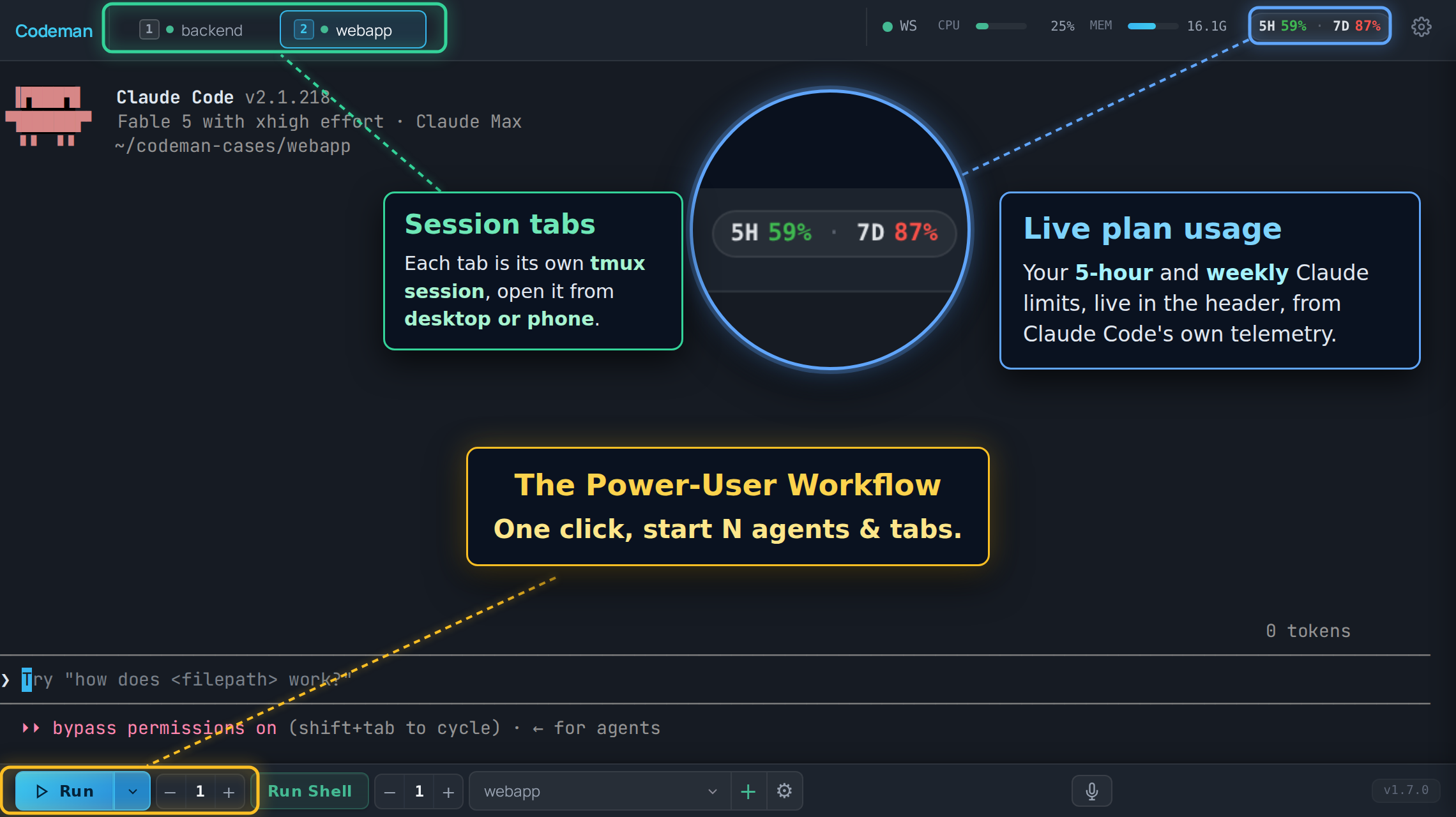
Most of Codeman's UI is **opt-in**. A stock install shows a deliberately small header, and a
|
|
feature you read about here may simply not be on screen yet. Where that is the case, this
|
|
page says so and names the setting.
|
|
|
|
|
|
|
|
## Layout
|
|
|
|
| Region | What lives there |
|
|
| ------------------ | -------------------------------------------------------------------------------------- |
|
|
| **Header, left** | The "C" logo (goes home) and the session list, unless you moved it to the sidebar. |
|
|
| **Header, right** | Status chips and panel buttons, most of them off by default. |
|
|
| **Center** | The terminal for the active session, or the home screen when nothing is selected. |
|
|
| **Bottom toolbar** | Run, Stop, Run Shell, the case picker, and the instance counters. |
|
|
| **Overlays** | Panels and modals: Respawn, Cron, Subagents, File Viewer, Settings. |
|
|
|
|
## Session list layout
|
|
|
|
The session list lives in the header as a horizontal strip by default. With a lot of
|
|
sessions open that strip stops being scannable, so **App Settings → Appearance → Tabs →
|
|
Session List Layout** can move it into a vertical sidebar on the left instead, and
|
|
**Tab Orientation** can turn the strip itself into a vertical rail.
|
|
|
|
| Layout | Behaviour |
|
|
| -------------------- | --------------------------------------------------------------------------------- |
|
|
| **Header tab strip** | The default. Wraps to a second row on desktop, scrolls sideways on a phone. |
|
|
| **Left sidebar** | A vertical list with a filter box and a live session count. `Alt+B` collapses it to a narrow rail that keeps the status dots and task badges visible. On a phone it is an off-canvas drawer rather than a docked rail. A detailed variant adds the home screen's per-session line (`created 3d ago · working 12m`) and a status pill. |
|
|
| **Vertical rail** | The strip turned vertical beside the terminal, resizable, with detailed rows by default. **Vertical Rail Order** sorts it by activity (blocked on you first, then longest running, then most recently quiet), the same order as the home screens; pick *Manual* to get your own order and drag-reordering back. Desktop and tablet only. |
|
|
|
|
It is the same list either way, just re-hosted: tab order, drag-to-reorder, the `Alt+1`
|
|
to `Alt+9` numbers and every status colour below behave identically in both. The setting is
|
|
per device, so a sidebar on your desktop does not force one onto your phone.
|
|
|
|
## Session tabs
|
|
|
|
One tab per session, in your order, and that order syncs across your devices.
|
|
|
|
**Status is carried by the dot and the tab's own styling:**
|
|
|
|
| Look | Meaning |
|
|
| ----------------------------- | ----------------------------------------------------------------------- |
|
|
| Green dot | Alive, not currently working. |
|
|
| Pulsing green dot with a ring | Working on a turn. |
|
|
| Yellow tab, blinking | The agent is waiting for input from you. |
|
|
| Red tab, blinking | A question or permission prompt is blocking the session. |
|
|
| No dot | The session is not running. |
|
|
| Muted grey dot plus an `exited (137)` badge | The agent inside the pane has exited, with that exit code (or `exited (signal 9)`). A bare `exited` means tmux saw the pane die but did not report how, which is not the same as a clean `exited (0)`. Detailed sidebar and rail rows read `exited` in their pill. |
|
|
|
|

|
|
|
|
The alert states are steady colour with a pulse layered on top, not a blink between the
|
|
alert colour and nothing, so a tab that needs you looks like it needs you at every point in
|
|
the cycle. They survive a page reload: the state is re-seeded from the server on load, so
|
|
reloading while a permission prompt is blocking does not lose the red tab.
|
|
|
|
**Navigation:**
|
|
|
|
| Action | Keys |
|
|
| ------------------------------- | ------------------------------------------------------- |
|
|
| Jump to tab N | `Alt+1` to `Alt+9` (the number on the tab) |
|
|
| Next / previous | `Ctrl+Tab`, `Alt+[`, `Alt+]` |
|
|
| Move the active tab | `Ctrl+Shift+{`, `Ctrl+Shift+}` |
|
|
| Close | `Ctrl+W` |
|
|
| Find any session, open or past | `Ctrl+K` (also `Cmd+K` and `Alt+K`) |
|
|
|
|
Tabs can also be dragged to reorder.
|
|
|
|
### Automatic session names
|
|
|
|
Off by default. Turn on **Auto-name Sessions** (App Settings → Appearance → Tabs; synced
|
|
across devices) and a tab that still carries its generated name, such as `w3-myapp`, takes a
|
|
title from the first real prompt you submit, keeping the prefix: `w3-myapp: fix the login
|
|
redirect`. The strip shows the title and keeps the prefix in the tooltip, and the next
|
|
session in that case still counts up to `w4-myapp`. It happens once per session, only for
|
|
prompts you type or send through the input API (never a Ralph, respawn, cron or approval
|
|
answer), and never for shells. Slash commands such as `/clear` do not become titles; the
|
|
next prompt gets its turn. A name you set yourself, before or after, is never touched. The
|
|
title is derived locally from the prompt's first sentence; no text leaves the machine.
|
|
|
|
On phones the strip scrolls horizontally instead of wrapping, and the active tab is always
|
|
scrolled into view. It is not reordered to the front, so the `Alt+N` numbering stays stable.
|
|
|
|
### Lineage arcs
|
|
|
|
When one session spawns another (an agent starting a worker through the API), Codeman draws
|
|
a coloured arc under the strip connecting parent to child, with one colour per child. It is
|
|
how a fan-out of eight workers stays readable.
|
|
|
|
Desktop only, and on by default. Turn it off in **App Settings → Appearance**. Arcs are
|
|
skipped for tabs scrolled out of the strip.
|
|
|
|
## Header controls
|
|
|
|
The right side of the header. Almost all of these are off until you enable them in
|
|
**App Settings → Header & Panels**.
|
|
|
|
| Control | Default | What it does |
|
|
| ---------------------- | ------------------ | ------------------------------------------------------------------------------- |
|
|
| Connection dot | Always on | SSE connection health. Green is connected. |
|
|
| Font size `-` / `+` | Always on | `Ctrl +` / `Ctrl -` do the same. |
|
|
| CPU / MEM bars | On | Server resource use. |
|
|
| File Viewer | On | Toggles the file browser panel. |
|
|
| Settings gear | Always on | App Settings. |
|
|
| Plan usage chip | On, desktop only | Live Claude subscription usage. Claude-only, and needs its telemetry exporter, which the same setting installs. |
|
|
| Session Manager | Off | The full session list, live and historical. |
|
|
| Approvals bell | Off | Cross-session queue of prompts waiting on a human. Appears only when the count is above zero. Never shown on phones. |
|
|
| Read My Mind 🧠 | Off | Predicts your next prompt for this case. Claude-only. |
|
|
| Attachments | Off | Registered external files. |
|
|
| Away Digest | Off | What happened while you were gone. |
|
|
| Last Response | Off | Readable view of the agent's last answer, useful on phones. |
|
|
| Ultracode / Workflow | Off | Live workflow-run agents. |
|
|
| Notifications | Off | Notification history and settings. |
|
|
| Lifecycle Log | Off | Session start, exit, and kill audit trail. |
|
|
| Cron ⏰ | Off | Scheduled jobs. |
|
|
| Multi-monitor | Off, macOS | Opens a window spanning every display. |
|
|
| Split | Off, desktop only | View a second session beside the active one, with a draggable divider. |
|
|
| Tunnel indicator | When a tunnel runs | Cloudflare tunnel status. |
|
|
| Admin panel | Multi-user only | User administration. |
|
|
|
|
New header controls never appear on phones. Phone layout is deliberately minimal and is
|
|
covered in [Mobile Guide](Mobile-Guide).
|
|
|
|
## Connection state
|
|
|
|
The dot in the header is the quick read. Two louder surfaces exist because a cached page
|
|
with no server behind it used to look identical to a page with no sessions:
|
|
|
|
- **A full-screen overlay** when the page has never loaded server state. There is nothing
|
|
behind it worth preserving.
|
|
- **A banner** when the connection drops after state had loaded, so your scrollback stays
|
|
readable.
|
|
|
|
Both wait about 2.5 seconds before appearing, so a deploy that restarts the server does not
|
|
flash a warning at you every time. If the browser reports itself offline, the grace period
|
|
is skipped.
|
|
|
|
There is also a watchdog for the case where the connection stops delivering without
|
|
erroring. If the server's heartbeat stops arriving, Codeman reconnects on its own rather
|
|
than sitting on a green dot showing frozen data.
|
|
|
|
## The terminal
|
|
|
|
A real terminal: xterm.js in the browser, a real PTY on the server, tmux in between. Full
|
|
TUIs render correctly.
|
|
|
|
Worth knowing:
|
|
|
|
- **Scrollback.** Agent/TUI sessions pull their entire tmux scrollback on first open.
|
|
Shell sessions open from a bounded recent tail so a large transcript cannot stall tab
|
|
switching; press **Load full history** to pull the rest explicitly. Ordinary Shell scrolling
|
|
and automatic output recovery stay within the bounded browser buffer.
|
|
- **Wheel and touch scrolling** are forwarded into Claude's own transcript when a recent
|
|
Claude runs fullscreen, so the wheel scrolls the conversation rather than the terminal.
|
|
Claude's default inline view keeps its history in the terminal and scrolls locally. `Shift+Wheel` is
|
|
always local scrollback. Other CLIs scroll locally.
|
|
- **Selection copy.** `Ctrl+C` copies when text is selected and interrupts when it is not.
|
|
`Ctrl+Shift+C` always copies.
|
|
- **Selecting where the CLI owns the mouse.** `Shift+drag` starts a selection even in a pane
|
|
whose mouse events are forwarded to the CLI, and right-click copies the selection (with
|
|
nothing selected the native menu is left alone). **Auto Copy Selection** in App Settings
|
|
copies the moment you release.
|
|
- **Zero-lag input.** On touch devices, keystrokes paint locally before the round trip. See
|
|
[Input And Voice](Input-And-Voice).
|
|
- **Renderer.** WebGL by default, with a watchdog that falls back to DOM rendering if the
|
|
GPU stalls. `?nowebgl` forces DOM rendering for one page load.
|
|
|
|
## The home screen
|
|
|
|
With no session selected you get the welcome screen: run buttons for the CLIs Codeman
|
|
found, a QR code when a password is set, cross-session search, and **Resume Conversation**,
|
|
which lists past sessions including Claude conversations started outside Codeman entirely.
|
|
|
|
Two extras depending on the device:
|
|
|
|
- **Desktop, wide windows**: your open tabs appear as a rail docked to the left edge, in
|
|
overview order (blocked on you first, then longest running, then most recently quiet),
|
|
with created and state-duration stamps. It needs at least 1180px of width; below that
|
|
it is hidden so it cannot overlap the search panel.
|
|
- **Phones**: tapping the "C" logo gives a session overview instead: NEEDS YOU first, then
|
|
current sessions, then past ones. On by default.
|
|
|
|
## Panels
|
|
|
|
| Panel | Opened from | Covered in |
|
|
| ---------------- | --------------------------------- | ---------------------------------------------------------------- |
|
|
| Respawn | Session Options | [Keeping Agents Running](Keeping-Agents-Running) |
|
|
| Ralph | Session Options | [Autonomous Loops](Autonomous-Loops) |
|
|
| Orchestrator | Toolbar | [Autonomous Loops](Autonomous-Loops) |
|
|
| Cron | Header ⏰ (opt-in) | [Cron Jobs](Cron-Jobs) |
|
|
| Subagents | Automatic while agents run | [Watching Agents Work](Watching-Agents-Work) |
|
|
| Ultracode | Header (opt-in) | [Watching Agents Work](Watching-Agents-Work) |
|
|
| File Viewer | Header | [Working With Files](Working-With-Files) |
|
|
| Attachments | Header (opt-in) | [Working With Files](Working-With-Files) |
|
|
| Approvals | Header bell (opt-in) | [Notifications And Approvals](Notifications-And-Approvals) |
|
|
| App Settings | Header gear | [Settings Reference](Settings-Reference) |
|
|
|
|
Session-specific configuration lives in **Session Options**, reachable from the tab. App
|
|
Settings is global; Session Options is per session.
|
|
|
|
## Search and the session palette
|
|
|
|
`Ctrl+K` opens the session palette: every session, live or historical, filtered as you
|
|
type. Picking a past one resumes its conversation.
|
|
|
|
The search box on the home screen is wider in scope. It federates over session metadata,
|
|
run-summary events, and attachment history, filtered by type, case, status, and date. It
|
|
does substring matching over data already in memory, with no regex and no filesystem reads,
|
|
so it is fast and cannot be turned into a traversal.
|
|
|
|
## Appearance
|
|
|
|
**App Settings → Appearance** carries the theme skins, including light ones. The choice is
|
|
applied before the first paint, so there is no flash of the wrong theme on load. Terminal
|
|
font family and weight are per device too: a normal and a bold weight, each from 100 to
|
|
900, and the bundled JetBrains Mono renders every step.
|
|
|
|
The same section has the entrance animations for tabs, terminals, agent windows, and
|
|
lineage lines. All of them default to the legacy no-animation behaviour, so an untouched
|
|
install animates nothing.
|
|
|
|
## Read next
|
|
|
|
- [Keyboard Shortcuts](Keyboard-Shortcuts) - the full list, and how to rebind.
|
|
- [Settings Reference](Settings-Reference) - every setting, and why some follow you across devices and others do not.
|
|
- [Mobile Guide](Mobile-Guide) - what changes on a phone.
|
|
- [Watching Agents Work](Watching-Agents-Work) - subagent windows and workflow runs.
|