 Codeman maintainer
f0e13f9fc3
Codeman maintainer
f0e13f9fc3
Replace the misaligned 8-line keystroke-flow diagram (its branch sat two
columns off the junction it attached to) with a two-lane contrast that
makes the same point in two lines: stock xterm.js waiting 300ms vs the
overlay painting immediately. The mechanism detail it was annotating
moved into the following paragraph.

Add a Codeman callout between the badges and the demo GIF, with links to
getcodeman.com, the install one-liner and the repo, and rewrite the
bottom Origin section so it argues credibility instead of repeating the
promo.

Not released: the npm page updates only on publish, so the next COM
needs an "xterm-zerolag-input": patch changeset for this to ship.

Co-Authored-By: Claude Opus 5 (1M context) <noreply@anthropic.com>
18 KiB
xterm-zerolag-input
Make typing feel instant in xterm.js, no matter how far away the server is.
A pixel-perfect local echo overlay. Client-side only. Zero dependencies.






Made for Codeman
This overlay is the local echo engine of Codeman, mission control for AI coding agents: run and monitor a dozen Claude Code, Codex, OpenCode and Gemini sessions at once, watch their subagents work in live floating windows, let them run autonomously overnight, and drive all of it from your phone.
That last part is why this library exists. The demo below is a real Codeman session on two phones.
getcodeman.com · install with
curl -fsSL https://getcodeman.com/install | bash· star it on GitHub
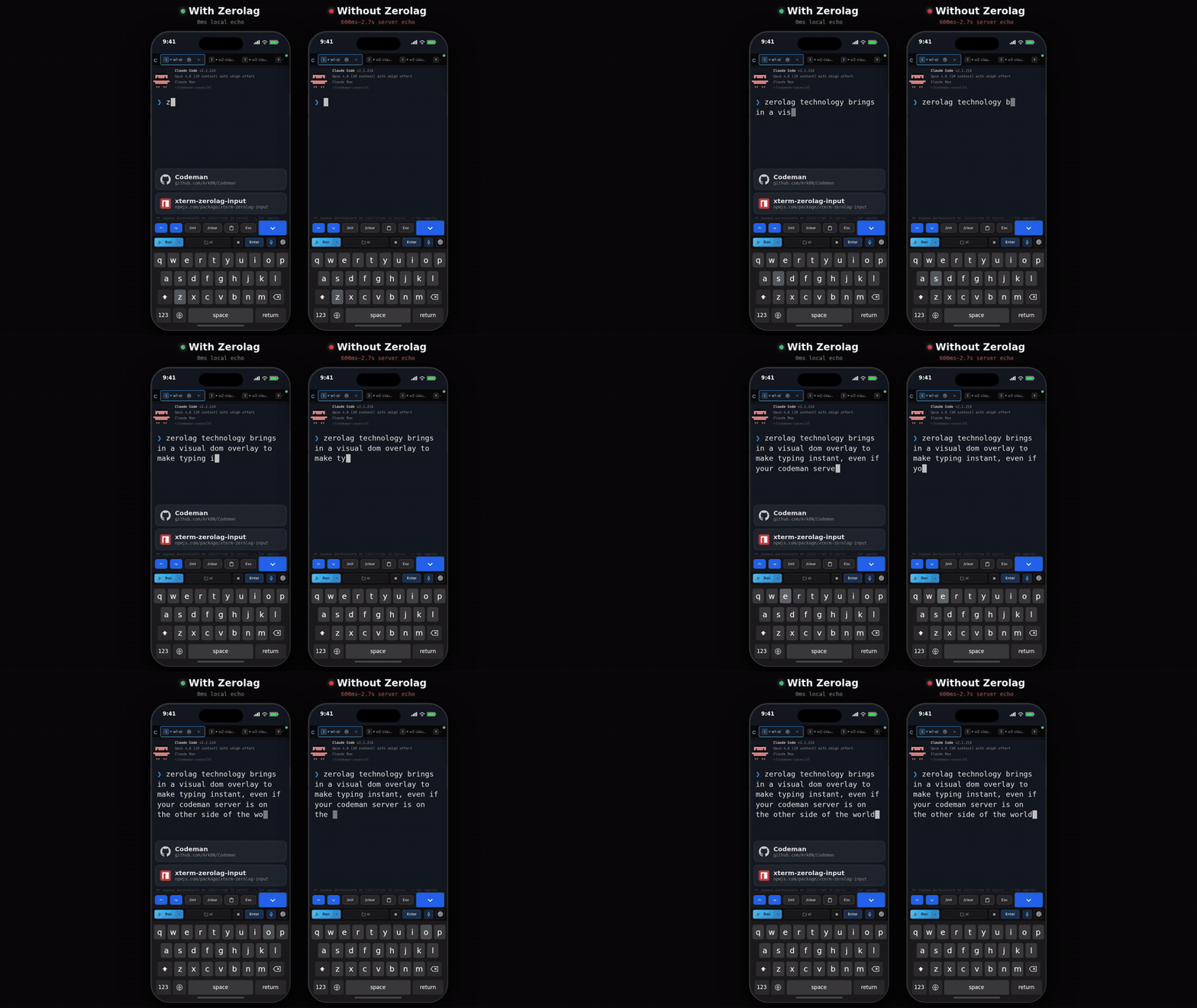
Two phones, the same remote session, the same slow link.
Left: the zerolag overlay paints every keystroke at 0ms. Right: stock xterm.js waits 600ms to 2.7s for the server to echo it back.
The 30-second version
Over a remote connection, xterm.js shows you a character only after it has flown to the server and back. At 100-500ms RTT that reads as broken: you type ahead of the screen, you cannot see your typos, and you start pecking one key at a time to stay in sync.
  stock xterm.js   keypress ─────── 300 ms ───────→ character appears
  with zerolag     keypress → character appears  ·  echo lands later, unseen
Same keystroke, same link. The only difference is who you wait for: the server, or nobody.
xterm-zerolag-input paints your keystrokes immediately, as an absolutely-positioned DOM overlay locked to the terminal's character grid. The byte still goes to the PTY exactly as before, so nothing about your shell changes. When the server echo lands 300ms later, the overlay clears and the real terminal text takes over on the same pixels. The handoff is invisible.
No backend changes. No protocol. No server support. It is a client-side addon that never touches the wire.
Why this one
| Survives full-screen TUIs | Ink, blessed, and friends repaint the whole screen constantly. The overlay is a separate DOM layer they cannot reach, so it does not get clobbered. |
| Pixel-matched to the canvas | Each character is its own absolutely-positioned <span> at exact cell coordinates, so it does not drift out of the grid like normal DOM text flow. |
| Wide characters included | CJK, fullwidth forms and emoji render double-width and position by visual column, using the terminal's Unicode addon when one is loaded. |
| Backspace that actually works | A three-layer cascade (unsent, in-flight, already on screen) tells you exactly what to forward to the PTY, so editing works through any mix of typed, flushed and tab-completed text. |
| You keep control of input | The addon never hooks onData for you. You decide what gets echoed and what gets forwarded, which is what makes char-at-a-time, buffered, and multi-session tab switching all possible. |
| Small and self-contained | 6.1 kB gzipped, zero runtime dependencies, dual CJS/ESM with full type declarations. |
| Proven under load | Extracted from Codeman, hardened over thousands of hours of real remote and mobile usage, 175 tests over every state transition. |
Built for anything that puts a terminal behind a network hop: SSH web clients, cloud IDEs, mobile terminals, Kubernetes and container consoles, remote agent dashboards, browser-based dev environments.
Install
npm install xterm-zerolag-input
Works with both xterm (pre-5.4) and @xterm/xterm (5.4+), and with the canvas, WebGL and DOM renderers.
Quick start
import { Terminal } from '@xterm/xterm';
import { ZerolagInputAddon } from 'xterm-zerolag-input';

const terminal = new Terminal();
terminal.open(document.getElementById('terminal')!);

// 1. Create the addon with your prompt character
const zerolag = new ZerolagInputAddon({
  prompt: { type: 'character', char: '$', offset: 2 },
});
terminal.loadAddon(zerolag);

// 2. Wire your input handler
terminal.onData((data) => {
  if (data === '\r') {
    const text = zerolag.pendingText;
    zerolag.clear();
    ws.send(text + '\r');
  } else if (data === '\x7f') {
    const source = zerolag.removeChar();
    if (source === 'flushed') ws.send(data); // only backspace text already in the PTY
  } else if (data.length === 1 && data.charCodeAt(0) >= 32) {
    zerolag.addChar(data);
  }
});

// 3. Re-render after terminal output (for full-screen TUI frameworks like Ink)
terminal.onWriteParsed(() => {
  if (zerolag.hasPending) zerolag.rerender();
});
That is the whole integration. Everything below is for tuning it.
Why this is hard
Most terminal UIs cannot do local echo, for three reasons:
-
Buffer writes get corrupted. Frameworks like Ink (React for terminals) redraw the entire screen on every state change. Anything written straight into the terminal buffer is overwritten immediately.
-
Cursor position lies. In Ink,
buffer.cursorYreflects internal render state (often near a status bar), not the visible prompt. You cannot trust it. -
Fonts do not line up. Canvas and WebGL renderers do their own text shaping. A DOM overlay has to pixel-match that grid, and normal DOM text flow drifts as sub-pixel glyph widths accumulate.
This library answers all three:
- a DOM overlay on its own z-index layer, which Ink cannot touch
- bottom-up buffer scanning for the prompt instead of trusting the cursor
- one absolutely-positioned
<span>per character at exact cell-grid coordinates
Prompt detection
The addon needs to know where user input starts. It scans the terminal buffer bottom-up. Three strategies:
Character (default)
// Bash: user@host:~$
{ type: 'character', char: '$', offset: 2 }

// Zsh: user@host ~ %
{ type: 'character', char: '%', offset: 2 }

// Fish / Starship: ❯
{ type: 'character', char: '❯', offset: 2 }

// Simple arrow: >
{ type: 'character', char: '>', offset: 2 }
offset = characters between the prompt marker and where user input begins ("$ " = 2).
Regex
For complex prompts. The g flag is stripped safely, so there is no lastIndex mutation.
{ type: 'regex', pattern: /\$\s*$/, offset: 2 }
{ type: 'regex', pattern: /\(venv\)\s+\w+\s+%/, offset: 2 }
Custom
Full control:
{
  type: 'custom',
  offset: 0,
  find: (terminal) => {
    // Return { row, col } or null. Row is viewport-relative.
    return { row: terminal.rows - 1, col: 0 };
  },
}
Switching prompts at runtime
If one terminal hosts several CLIs with different prompts, swap the strategy in place:
zerolag.setPrompt({ type: 'character', char: '❯', offset: 2 });
setPrompt() clears the cached prompt position and re-renders if anything is pending, so a mode switch cannot leave the overlay pinned to the old column.
API reference
ZerolagInputAddon
Implements the xterm.js ITerminalAddon interface. It deliberately does not hook terminal.onData(): you wire your own handler and call these methods, which is what gives you control over which keystrokes are echoed and which are forwarded.
Input
| Method | Returns | Description |
|---|---|---|
addChar(char) |
void |
Add a single printable character. Auto-detects existing buffer text on the first keystroke. |
appendText(text) |
void |
Append multiple characters (paste). |
removeChar() |
'pending' | 'flushed' | false |
Remove the last character. See backspace handling. |
clear() |
void |
Clear all state and hide the overlay. Call on Enter, Ctrl+C, Escape. |
Backspace handling
removeChar() cascades through three layers and tells you what it removed:
| Return | Source | Your action |
|---|---|---|
'pending' |
Unsent text (never transmitted to the PTY) | Do nothing |
'flushed' |
Text already sent to the PTY | Send \x7f to the PTY |
false |
Nothing to remove | Do nothing |
The cascade order is pending text, then flushed text, then auto-detected buffer text (which is what makes backspace work after tab completion). Backspace "just works" across any combination of typed, in-flight and completed text.
Flushed text
"Flushed" means sent to the PTY but the echo has not arrived yet. This happens during tab switches and tab completion.
| Method | Description |
|---|---|
setFlushed(count, text, render?) |
Mark text as flushed. Pass render=false during tab-switch restore, when the buffer is not loaded yet. |
getFlushed() |
Returns { count, text }. |
clearFlushed() |
Clear flushed state once the server echo arrives. |
Buffer detection
Finds text that exists after the prompt but was never typed through the overlay.
| Method | Description |
|---|---|
detectBufferText() |
Scan and return the detected text (or null), marking it flushed. Guarded: runs once per clear() cycle. |
resetBufferDetection() |
Re-enable detection. |
suppressBufferDetection() |
Block detection until the next clear(). Use for sessions that render UI framework text after the prompt. |
undoDetection() |
Undo the last detection: clears flushed state and re-enables detection. For tab-completion retries. |
Rendering
| Method | Description |
|---|---|
rerender() |
Force a re-render. Call after buffer reloads, screen redraws, resizes and reconnects. |
refreshFont() |
Re-cache font and color properties from the terminal. Call after a font size or theme change. |
Prompt
| Method | Description |
|---|---|
setPrompt(finder) |
Replace the prompt detection strategy at runtime. |
findPrompt() |
Find the prompt position. Returns { row, col } or null. |
readPromptText() |
Read the text after the prompt marker. Returns a string or null. |
State
| Property | Type | Description |
|---|---|---|
pendingText |
string |
Unacknowledged text (read-only) |
hasPending |
boolean |
true if the overlay has any content |
state |
ZerolagInputState |
Full snapshot: pendingText, flushedLength, flushedText, visible, promptPosition |
Options
{
  prompt?: PromptFinder,       // Default: { type: 'character', char: '>', offset: 2 }
  zIndex?: number,             // Default: 7
  backgroundColor?: string,    // Default: terminal theme background ('transparent' to disable)
  foregroundColor?: string,    // Default: terminal theme / computed .xterm-rows style
  showCursor?: boolean,        // Default: true
  cursorColor?: string,        // Default: terminal theme cursor
  scrollDebounceMs?: number,   // Default: 50
}
Integration patterns
Buffered input (hold until Enter)
The quick start above. Characters accumulate in the overlay and go out on Enter. Best for remote shells where you want to batch input.
Char-at-a-time (send immediately)
terminal.onData((data) => {
  if (data === '\r') {
    zerolag.clear();
    ws.send('\r');
  } else if (data === '\x7f') {
    zerolag.removeChar();
    ws.send(data);
  } else if (data.length === 1 && data.charCodeAt(0) >= 32) {
    zerolag.addChar(data);
    ws.send(data); // overlay shows the char while the echo travels back
  }
});
This is the mode that keeps shell features intact: tab completion, Ctrl+R history search, and readline bindings all still work, because every byte still reaches the PTY.
Tab switching (multi-session)
function switchToSession(newId: string) {
  // Save
  const pending = zerolag.pendingText;
  const { count, text } = zerolag.getFlushed();
  if (pending) sendToPty(currentId, pending);
  savedState.set(currentId, { count: count + pending.length, text: text + pending });
  zerolag.clear();

  // Load new buffer...
  loadBuffer(newId);

  // Restore
  zerolag.suppressBufferDetection();
  const saved = savedState.get(newId);
  if (saved) zerolag.setFlushed(saved.count, saved.text, false); // silent

  // Render after the buffer loads
  terminal.write('', () => zerolag.rerender());
}
Tab completion
const baseline = zerolag.readPromptText();
zerolag.clear();
sendToPty('\t');

// After the response:
zerolag.resetBufferDetection();
const detected = zerolag.detectBufferText();
if (detected && detected !== baseline) {
  zerolag.rerender(); // completion happened
} else if (detected) {
  zerolag.undoDetection(); // same text, retry next cycle
}
Resize, font, reconnect
fitAddon.fit();
zerolag.rerender();

terminal.options.fontSize = 18;
zerolag.refreshFont();

function onReconnect() {
  zerolag.rerender();
}
Wide characters (CJK, emoji)
Wide characters work out of the box: the overlay measures each character's cell width, renders double-width spans for wide ones, and positions later characters by visual column instead of character index. Line wrapping is computed in columns too, so a wrapped Japanese or Chinese line lands on the same cells the server will use.
For exact Unicode 11+ widths, load xterm's Unicode addon and the overlay will defer to it:
import { Unicode11Addon } from '@xterm/addon-unicode11';

terminal.loadAddon(new Unicode11Addon());
terminal.unicode.activeVersion = '11';
Without it, a built-in range table covers Hangul, Kana, CJK Unified (including Ext A through G), fullwidth forms and the emoji planes.
How it works
DOM structure
div.xterm-screen (position: relative)
  ├── div.xterm-rows (z-index: auto)     ← terminal owns this
  ├── div.xterm-selection (z-index: 1)
  ├── div.xterm-helpers (z-index: 5)
  ├── div.xterm-decoration-container (z-index: 6-7)
  └── div[zerolag overlay] (z-index: 7)  ← our overlay, invisible to Ink
Per-character grid alignment
Each character is an absolutely-positioned <span>:
left  = visualColumn * cellWidth   (CSS pixels)
top   = lineIndex    * cellHeight  (CSS pixels)
width = cellWidth * charCellWidth  (1 cell, or 2 for wide characters)
Positioning by visual column instead of letting the browser lay out text is what removes sub-pixel drift.
Font matching
fontFamily,fontSize,fontWeightfromterminal.optionsletterSpacingfrom the computed style of.xterm-rows-webkit-font-smoothing: antialiased(matches canvas grayscale AA)font-feature-settings: 'liga' 0, 'calt' 0(no ligatures)text-rendering: geometricPrecision
Cell dimensions
- xterm.js v5.x:
terminal._core._renderService.dimensions.css.cell(private API) - xterm.js v7+:
terminal.dimensions.css.cell(public API, auto-detected)
Prompt column locking
While flushed text exists the prompt column is locked, so a full-screen redraw cannot make the overlay jitter sideways. Row changes are still allowed, because output legitimately scrolls the prompt.
Scroll awareness
The overlay hides when the viewport is scrolled up (viewportY !== baseY) and re-renders, debounced, when you scroll back to the bottom.
Known limitations
- Canvas and WebGL font mismatch: minor sub-pixel differences are still possible. Per-character absolute positioning keeps them small.
- Grapheme clusters: widths are summed per code point, so ZWJ emoji sequences (for example 👨👩👧) and combining marks can be over-counted. Single-code-point emoji and CJK are correct.
- Password prompts: the overlay will happily show characters the server is not echoing. Call
clear()when you detect a no-echo prompt. - Prompt characters in output: if your prompt marker also appears in command output, detection can latch onto the wrong line. Use a regex or a custom finder.
Origin
Codeman needed this before anyone else did. A coding agent you drive from your phone over a tunnel is unusable if every keystroke costs a round trip.
So the overlay was built there, ran in production for thousands of hours, and survived three deep code audits before being pulled out into this standalone library with its tests intact. Nothing was reimplemented for the extraction: the engine here is the one Codeman ships.
Want the whole thing? getcodeman.com · github.com/Ark0N/Codeman
License
MIT, Codeman Contributors