 Codeman maintainer
5b920cb43d
Codeman maintainer
5b920cb43d
Finishes #376. The contributed keystroke tracker sat on the raw byte stream
and named tabs wrong five ways (every prompt, every write path, a bare Esc
eating the next prompt's first character, pasted newlines as Enter, any CSI
clearing the draft) and replaced the whole name, which dropped the case from
the tab and reset the w<n> counter. This lands the feature with each of those
closed:

- First prompt means the first: applyAutoName() flips a placeholder to
  `auto` whether or not the string changed. nameSource is now the tri-state
  placeholder | auto | manual; the name setter is the only manual path.
- Only user-originated input counts: write()/writeViaMux() take
  SessionWriteOptions.fromUser, set by the browser WS path and POST /input
  only, so Ralph, respawn, cron, approvals and the trust-dialog keys can
  never name a tab. A startMode 'shell' CLI never feeds the tracker (a
  capability, not an id check); the send-key route feeds trackUserInput()
  because its line feed bypasses the session.
- Prefix form `w3-case: title`: parseSessionPrefix() already renders it as
  the title with the prefix in the tooltip and the next-session counter
  still matches it. Composed within MAX_SESSION_NAME_LENGTH.
- Tracker rules per key: bare Esc resolves at chunk end; mouse/focus
  reports, Tab, cursor keys, Shift+Tab are no-ops; Up/Down and Ctrl+P/N/R
  taint the draft so Enter submits nothing rather than a fragment;
  bracketed-paste newlines and Ctrl+J / Shift+Enter join with one space;
  the draft keeps its head past 8192 code points; an escape past 64 bytes
  is abandoned.
- Title: slash commands by shape (a path is a prompt), `!` escapes
  refused, first sentence only past 8 code points ("e.g." is not a title),
  72 code points on a word boundary.
- Synced `autoNameSessions` setting, default OFF (the prompt reaches
  mux-sessions.json, session:updated and /api/search), App Settings ->
  Appearance -> Tabs, read fresh per prompt after the eligibility check.

Tests: test/session-auto-name.test.ts (tracker, title, composition,
ownership, emit gating), the wiring test (once, prefix, setting off,
manual protected), test/routes/session-name-routes.test.ts (PUT /name
flips to manual and persists). Verified live on an isolated instance: API
and browser-typed prompts name the tab, a second prompt does not, shells
and renamed tabs are untouched, nameSource survives a restart.

Co-Authored-By: Claude Fable 5.1 <noreply@anthropic.com>
14 KiB
The Dashboard
What the interface is telling you, and which parts of it are hidden until you turn them on.
Most of Codeman's UI is opt-in. A stock install shows a deliberately small header, and a feature you read about here may simply not be on screen yet. Where that is the case, this page says so and names the setting.
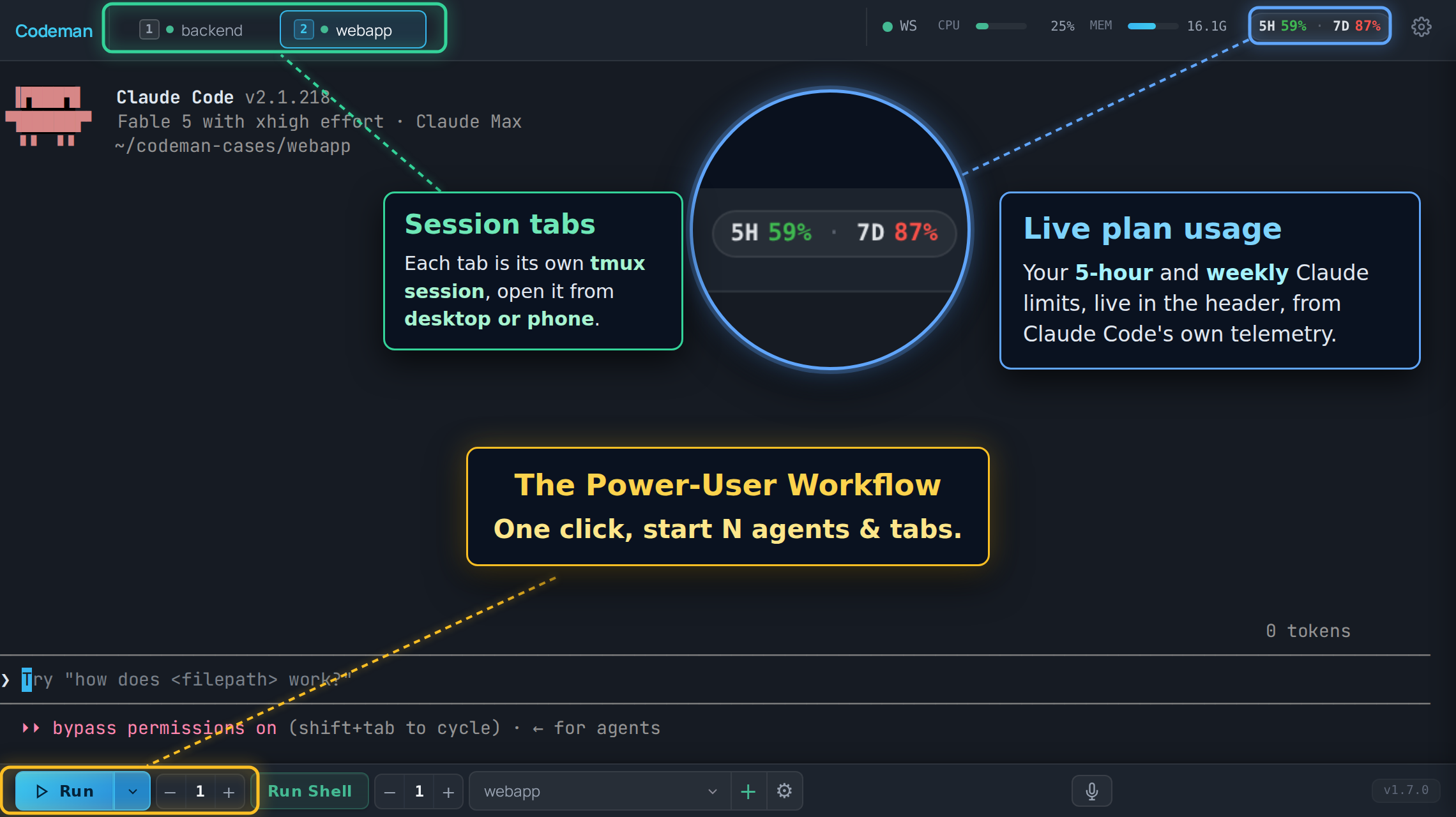
Layout
| Region | What lives there |
|---|---|
| Header, left | The "C" logo (goes home) and the session list, unless you moved it to the sidebar. |
| Header, right | Status chips and panel buttons, most of them off by default. |
| Center | The terminal for the active session, or the home screen when nothing is selected. |
| Bottom toolbar | Run, Stop, Run Shell, the case picker, and the instance counters. |
| Overlays | Panels and modals: Respawn, Cron, Subagents, File Viewer, Settings. |
Session list layout
The session list lives in the header as a horizontal strip by default. With a lot of sessions open that strip stops being scannable, so App Settings → Appearance → Tabs → Session List Layout can move it into a vertical sidebar on the left instead.
| Layout | Behaviour |
|---|---|
| Header tab strip | The default. Wraps to a second row on desktop, scrolls sideways on a phone. |
| Left sidebar | A vertical list with a filter box and a live session count. Alt+B collapses it to a narrow rail that keeps the status dots and task badges visible. On a phone it is an off-canvas drawer rather than a docked rail. |
It is the same list either way, just re-hosted: tab order, drag-to-reorder, the Alt+1
to Alt+9 numbers and every status colour below behave identically in both. The setting is
per device, so a sidebar on your desktop does not force one onto your phone.
Session tabs
One tab per session, in your order, and that order syncs across your devices.
Status is carried by the dot and the tab's own styling:
| Look | Meaning |
|---|---|
| Green dot | Alive, not currently working. |
| Pulsing green dot with a ring | Working on a turn. |
| Yellow tab, blinking | The agent is waiting for input from you. |
| Red tab, blinking | A question or permission prompt is blocking the session. |
| No dot | The session is not running. |

The alert states are steady colour with a pulse layered on top, not a blink between the alert colour and nothing, so a tab that needs you looks like it needs you at every point in the cycle. They survive a page reload: the state is re-seeded from the server on load, so reloading while a permission prompt is blocking does not lose the red tab.
Navigation:
| Action | Keys |
|---|---|
| Jump to tab N | Alt+1 to Alt+9 (the number on the tab) |
| Next / previous | Ctrl+Tab, Alt+[, Alt+] |
| Move the active tab | Ctrl+Shift+{, Ctrl+Shift+} |
| Close | Ctrl+W |
| Find any session, open or past | Ctrl+K (also Cmd+K and Alt+K) |
Tabs can also be dragged to reorder.
Automatic session names
Off by default. Turn on Auto-name Sessions (App Settings → Appearance → Tabs; synced
across devices) and a tab that still carries its generated name, such as w3-myapp, takes a
title from the first real prompt you submit, keeping the prefix: w3-myapp: fix the login redirect. The strip shows the title and keeps the prefix in the tooltip, and the next
session in that case still counts up to w4-myapp. It happens once per session, only for
prompts you type or send through the input API (never a Ralph, respawn, cron or approval
answer), and never for shells. Slash commands such as /clear do not become titles; the
next prompt gets its turn. A name you set yourself, before or after, is never touched. The
title is derived locally from the prompt's first sentence; no text leaves the machine.
On phones the strip scrolls horizontally instead of wrapping, and the active tab is always
scrolled into view. It is not reordered to the front, so the Alt+N numbering stays stable.
Lineage arcs
When one session spawns another (an agent starting a worker through the API), Codeman draws a coloured arc under the strip connecting parent to child, with one colour per child. It is how a fan-out of eight workers stays readable.
Desktop only, and on by default. Turn it off in App Settings → Appearance. Arcs are skipped for tabs scrolled out of the strip.
Header controls
The right side of the header. Almost all of these are off until you enable them in App Settings → Header & Panels.
| Control | Default | What it does |
|---|---|---|
| Connection dot | Always on | SSE connection health. Green is connected. |
Font size - / + |
Always on | Ctrl + / Ctrl - do the same. |
| CPU / MEM bars | On | Server resource use. |
| File Viewer | On | Toggles the file browser panel. |
| Settings gear | Always on | App Settings. |
| Plan usage chip | On, desktop only | Live Claude subscription usage. Claude-only, and needs its telemetry exporter, which the same setting installs. |
| Session Manager | Off | The full session list, live and historical. |
| Approvals bell | Off | Cross-session queue of prompts waiting on a human. Appears only when the count is above zero. Never shown on phones. |
| Read My Mind 🧠 | Off | Predicts your next prompt for this case. Claude-only. |
| Attachments | Off | Registered external files. |
| Away Digest | Off | What happened while you were gone. |
| Last Response | Off | Readable view of the agent's last answer, useful on phones. |
| Ultracode / Workflow | Off | Live workflow-run agents. |
| Notifications | Off | Notification history and settings. |
| Lifecycle Log | Off | Session start, exit, and kill audit trail. |
| Cron ⏰ | Off | Scheduled jobs. |
| Multi-monitor | Off, macOS | Opens a window spanning every display. |
| Tunnel indicator | When a tunnel runs | Cloudflare tunnel status. |
| Admin panel | Multi-user only | User administration. |
New header controls never appear on phones. Phone layout is deliberately minimal and is covered in Mobile Guide.
Connection state
The dot in the header is the quick read. Two louder surfaces exist because a cached page with no server behind it used to look identical to a page with no sessions:
- A full-screen overlay when the page has never loaded server state. There is nothing behind it worth preserving.
- A banner when the connection drops after state had loaded, so your scrollback stays readable.
Both wait about 2.5 seconds before appearing, so a deploy that restarts the server does not flash a warning at you every time. If the browser reports itself offline, the grace period is skipped.
There is also a watchdog for the case where the connection stops delivering without erroring. If the server's heartbeat stops arriving, Codeman reconnects on its own rather than sitting on a green dot showing frozen data.
The terminal
A real terminal: xterm.js in the browser, a real PTY on the server, tmux in between. Full TUIs render correctly.
Worth knowing:
- Scrollback. Agent/TUI sessions pull their entire tmux scrollback on first open. Shell sessions open from a bounded recent tail so a large transcript cannot stall tab switching; press Load full history to pull the rest explicitly. Ordinary Shell scrolling and automatic output recovery stay within the bounded browser buffer.
- Wheel and touch scrolling are forwarded into Claude's own transcript on recent Claude
versions, so the wheel scrolls the conversation rather than the terminal.
Shift+Wheelis always local scrollback. Other CLIs scroll locally. - Selection copy.
Ctrl+Ccopies when text is selected and interrupts when it is not.Ctrl+Shift+Calways copies. - Zero-lag input. On touch devices, keystrokes paint locally before the round trip. See Input And Voice.
- Renderer. WebGL by default, with a watchdog that falls back to DOM rendering if the
GPU stalls.
?nowebglforces DOM rendering for one page load.
The home screen
With no session selected you get the welcome screen: run buttons for the CLIs Codeman found, a QR code when a password is set, cross-session search, and Resume Conversation, which lists past sessions including Claude conversations started outside Codeman entirely.
Two extras depending on the device:
- Desktop, wide windows: your open tabs appear as a rail docked to the left edge, in tab order, with created and last-active stamps. It needs at least 1180px of width; below that it is hidden so it cannot overlap the search panel.
- Phones: tapping the "C" logo gives a session overview instead: NEEDS YOU first, then current sessions, then past ones. On by default.
Panels
| Panel | Opened from | Covered in |
|---|---|---|
| Respawn | Session Options | Keeping Agents Running |
| Ralph | Session Options | Autonomous Loops |
| Orchestrator | Toolbar | Autonomous Loops |
| Cron | Header ⏰ (opt-in) | Cron Jobs |
| Subagents | Automatic while agents run | Watching Agents Work |
| Ultracode | Header (opt-in) | Watching Agents Work |
| File Viewer | Header | Working With Files |
| Attachments | Header (opt-in) | Working With Files |
| Approvals | Header bell (opt-in) | Notifications And Approvals |
| App Settings | Header gear | Settings Reference |
Session-specific configuration lives in Session Options, reachable from the tab. App Settings is global; Session Options is per session.
Search and the session palette
Ctrl+K opens the session palette: every session, live or historical, filtered as you
type. Picking a past one resumes its conversation.
The search box on the home screen is wider in scope. It federates over session metadata, run-summary events, and attachment history, filtered by type, case, status, and date. It does substring matching over data already in memory, with no regex and no filesystem reads, so it is fast and cannot be turned into a traversal.
Appearance
App Settings → Appearance carries the theme skins, including light ones. The choice is applied before the first paint, so there is no flash of the wrong theme on load.
The same section has the entrance animations for tabs, terminals, agent windows, and lineage lines. All of them default to the legacy no-animation behaviour, so an untouched install animates nothing.
Read next
- Keyboard Shortcuts - the full list, and how to rebind.
- Settings Reference - every setting, and why some follow you across devices and others do not.
- Mobile Guide - what changes on a phone.
- Watching Agents Work - subagent windows and workflow runs.