Codeman

The missing control plane for AI coding agents

Agent Visualization • Zero-Lag Input Overlay • Mobile-First UI • Respawn Controller • Multi-Session Dashboard

License: MIT Node.js 18+ TypeScript 5.9 Fastify Tests

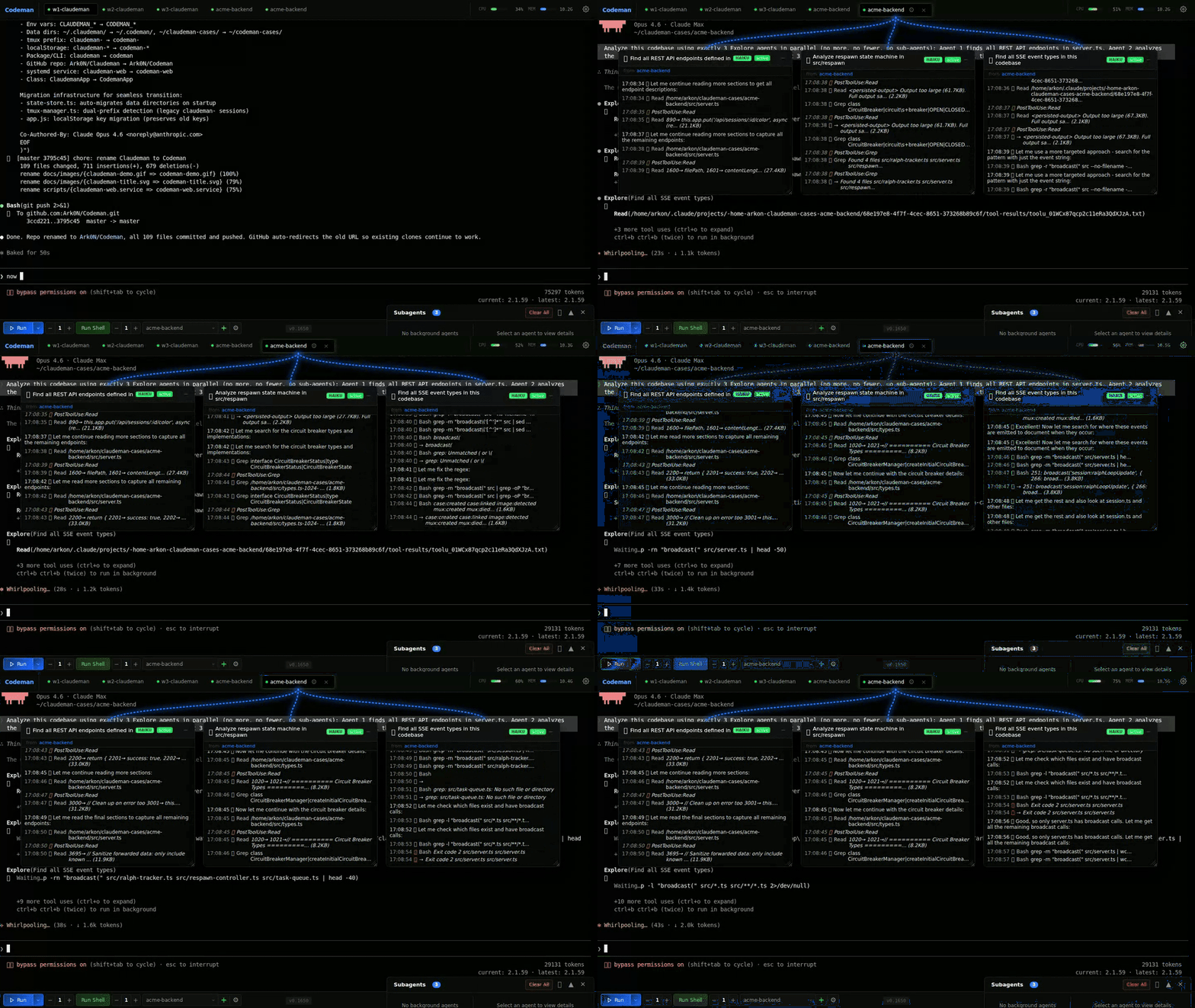
Codeman — parallel subagent visualization

--- ## Quick Start - Installation ```bash curl -fsSL https://raw.githubusercontent.com/Ark0N/Codeman/master/install.sh | bash ``` This installs Node.js and tmux if missing, clones Codeman to `~/.codeman/app`, and builds it. You'll need at least one AI coding CLI installed — [Claude Code](https://docs.anthropic.com/en/docs/claude-code) or [OpenCode](https://opencode.ai) (or both). After install: ```bash codeman web # Open http://localhost:3000 — press Ctrl+Enter to start your first session ```
Run as a background service **Linux (systemd):** ```bash mkdir -p ~/.config/systemd/user cat > ~/.config/systemd/user/codeman-web.service << EOF [Unit] Description=Codeman Web Server After=network.target [Service] Type=simple ExecStart=$(which node) $HOME/.codeman/app/dist/index.js web Restart=always RestartSec=10 [Install] WantedBy=default.target EOF systemctl --user daemon-reload systemctl --user enable --now codeman-web loginctl enable-linger $USER ``` **macOS (launchd):** ```bash mkdir -p ~/Library/LaunchAgents cat > ~/Library/LaunchAgents/com.codeman.web.plist << EOF Label com.codeman.web ProgramArguments $(which node) $HOME/.codeman/app/dist/index.js web RunAtLoad KeepAlive StandardOutPath /tmp/codeman.log StandardErrorPath /tmp/codeman.log EOF launchctl bootstrap gui/$(id -u) ~/Library/LaunchAgents/com.codeman.web.plist ```
Windows (WSL) ```powershell wsl bash -c "curl -fsSL https://raw.githubusercontent.com/Ark0N/Codeman/master/install.sh | bash" ``` Codeman requires tmux, so Windows users need [WSL](https://learn.microsoft.com/en-us/windows/wsl/install). If you don't have WSL yet: run `wsl --install` in an admin PowerShell, reboot, open Ubuntu, then install your preferred AI coding CLI inside WSL ([Claude Code](https://docs.anthropic.com/en/docs/claude-code) or [OpenCode](https://opencode.ai)). After installing, `http://localhost:3000` is accessible from your Windows browser.
--- ## Mobile-Optimized Web UI The most responsive AI coding agent experience on any phone. Full xterm.js terminal with local echo, swipe navigation, and a touch-optimized interface designed for real remote work — not a desktop UI crammed onto a small screen.
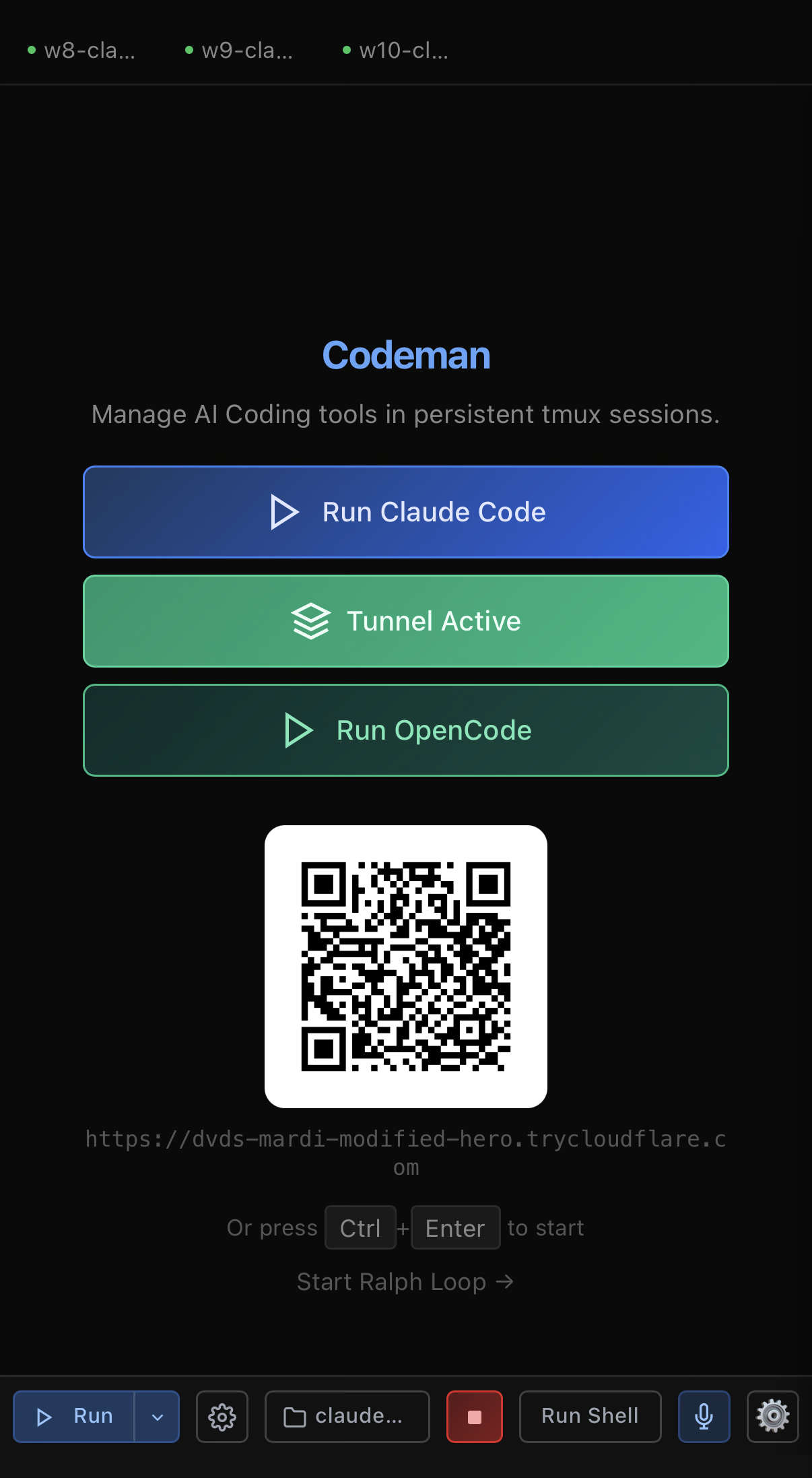
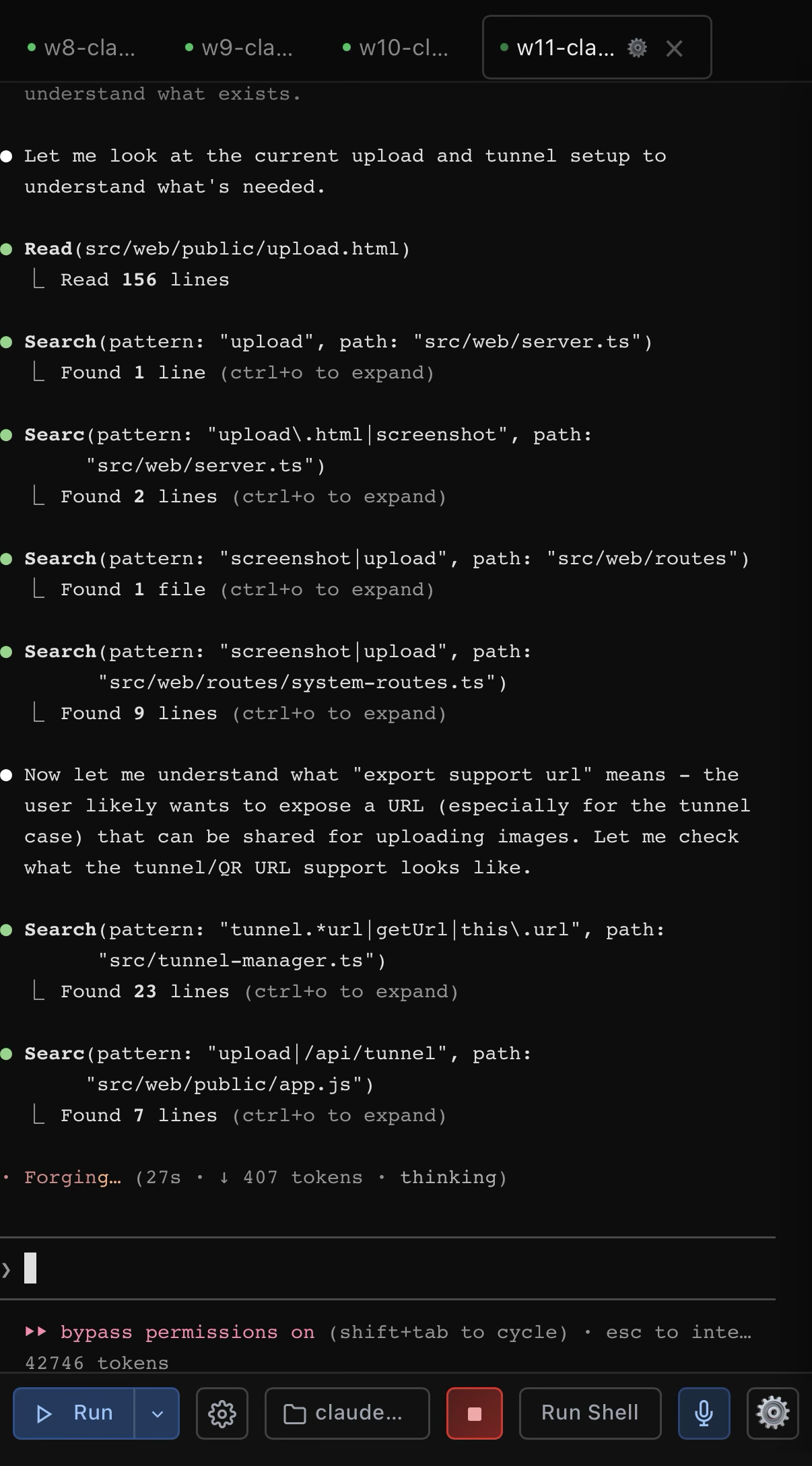
Mobile — landing page with QR auth Mobile — idle session with keyboard accessory Mobile — active agent session
Landing page with QR auth Keyboard accessory bar Agent working in real-time
Terminal Apps Codeman Mobile
200-300ms input lag over remoteLocal echo — instant feedback
Tiny text, no contextFull xterm.js terminal
No session managementSwipe between sessions
No notificationsPush alerts for approvals and idle
Manual reconnecttmux persistence
No agent visibilityBackground agents in real-time
Copy-paste slash commandsOne-tap /init, /clear, /compact
Password typing on phoneQR code scan — instant auth
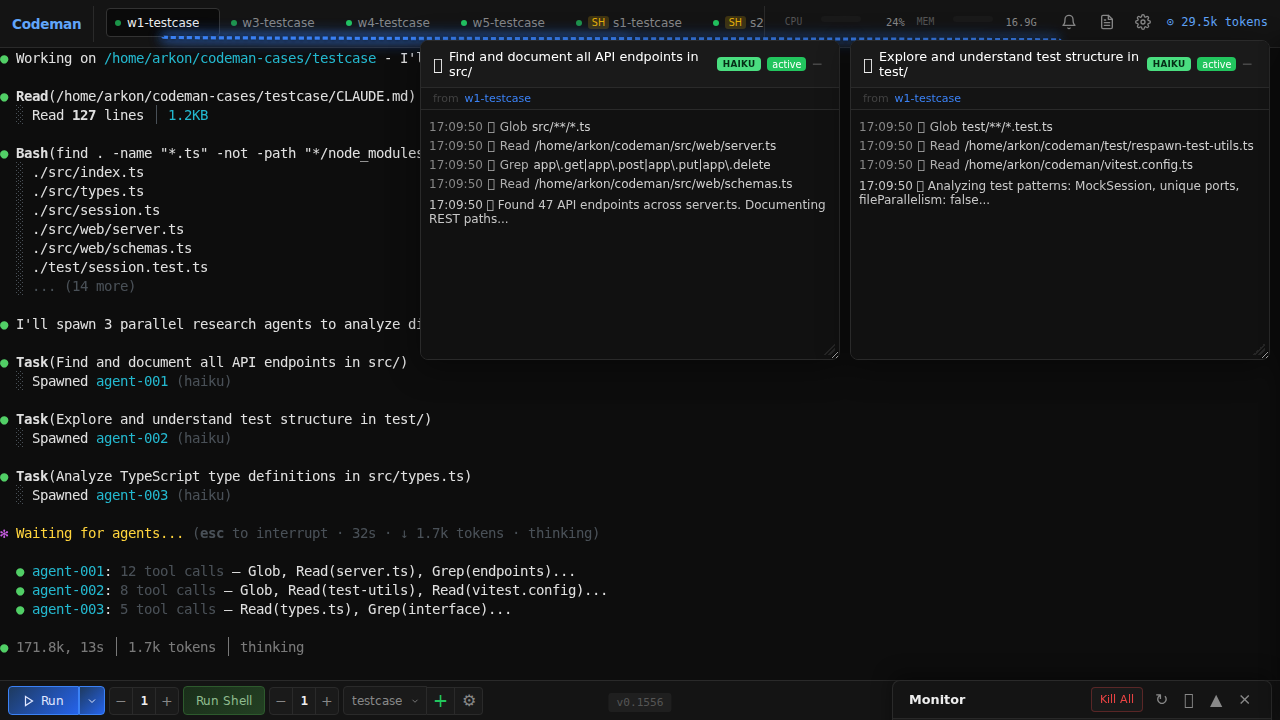
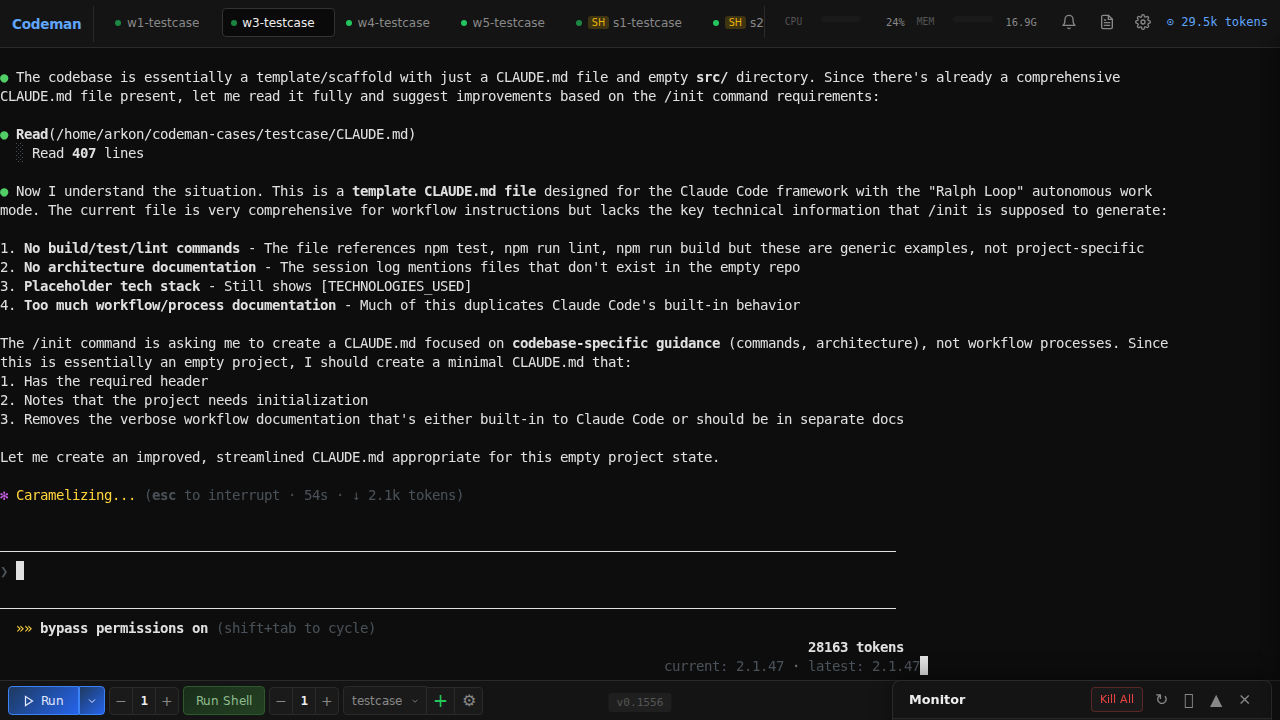
### Secure QR Code Authentication Typing passwords on a phone keyboard is miserable. Codeman replaces it with **cryptographically secure single-use QR tokens** — scan the code displayed on your desktop and your phone is authenticated instantly. Each QR encodes a URL containing a 6-character short code that maps to a 256-bit secret (`crypto.randomBytes(32)`) on the server. Tokens auto-rotate every **60 seconds**, are **atomically consumed on first scan** (replays always fail), and use **hash-based `Map.get()` lookup** that leaks nothing through response timing. The short code is an opaque pointer — the real secret never appears in browser history, `Referer` headers, or Cloudflare edge logs. The security design addresses all 6 critical QR auth flaws identified in ["Demystifying the (In)Security of QR Code-based Login"](https://www.usenix.org/conference/usenixsecurity25/presentation/zhang-xin) (USENIX Security 2025, which found 47 of the top-100 websites vulnerable): single-use enforcement, short TTL, cryptographic randomness, server-side generation, real-time desktop notification on scan (QRLjacking detection), and IP + User-Agent session binding with manual revocation. Dual-layer rate limiting (per-IP + global) makes brute force infeasible across 62^6 = 56.8 billion possible codes. Full security analysis: [`docs/qr-auth-plan.md`](docs/qr-auth-plan.md) ### Touch-Optimized Interface - **Keyboard accessory bar** — `/init`, `/clear`, `/compact` quick-action buttons above the virtual keyboard. Destructive commands (`/clear`, `/compact`) require a double-press to confirm — first tap arms the button, second tap executes — so you never fire one by accident on a bumpy commute - **Swipe navigation** — left/right on the terminal to switch sessions (80px threshold, 300ms) - **Smart keyboard handling** — toolbar and terminal shift up when keyboard opens (uses `visualViewport` API with 100px threshold for iOS address bar drift) - **Safe area support** — respects iPhone notch and home indicator via `env(safe-area-inset-*)` - **44px touch targets** — all buttons meet iOS Human Interface Guidelines minimum sizes - **Bottom sheet case picker** — slide-up modal replaces the desktop dropdown - **Native momentum scrolling** — `-webkit-overflow-scrolling: touch` for buttery scroll ```bash codeman web --https # Open on your phone: https://:3000 ``` > `localhost` works over plain HTTP. Use `--https` when accessing from another device, or use [Tailscale](https://tailscale.com/) (recommended) — it provides a private network so you can access `http://:3000` from your phone without TLS certificates. --- ## Live Agent Visualization Watch background agents work in real-time. Codeman monitors agent activity and displays each agent in a draggable floating window with animated Matrix-style connection lines back to the parent session.

Subagent Visualization

- **Floating terminal windows** — draggable, resizable panels for each agent with a live activity log showing every tool call, file read, and progress update as it happens - **Connection lines** — animated green lines linking parent sessions to their child agents, updating in real-time as agents spawn and complete - **Status & model badges** — green (active), yellow (idle), blue (completed) indicators with Haiku/Sonnet/Opus model color coding - **Auto-behavior** — windows auto-open on spawn, auto-minimize on completion, tab badge shows "AGENT" or "AGENTS (n)" count - **Nested agents** — supports 3-level hierarchies (lead session -> teammate agents -> sub-subagents) --- ## Zero-Lag Input Overlay

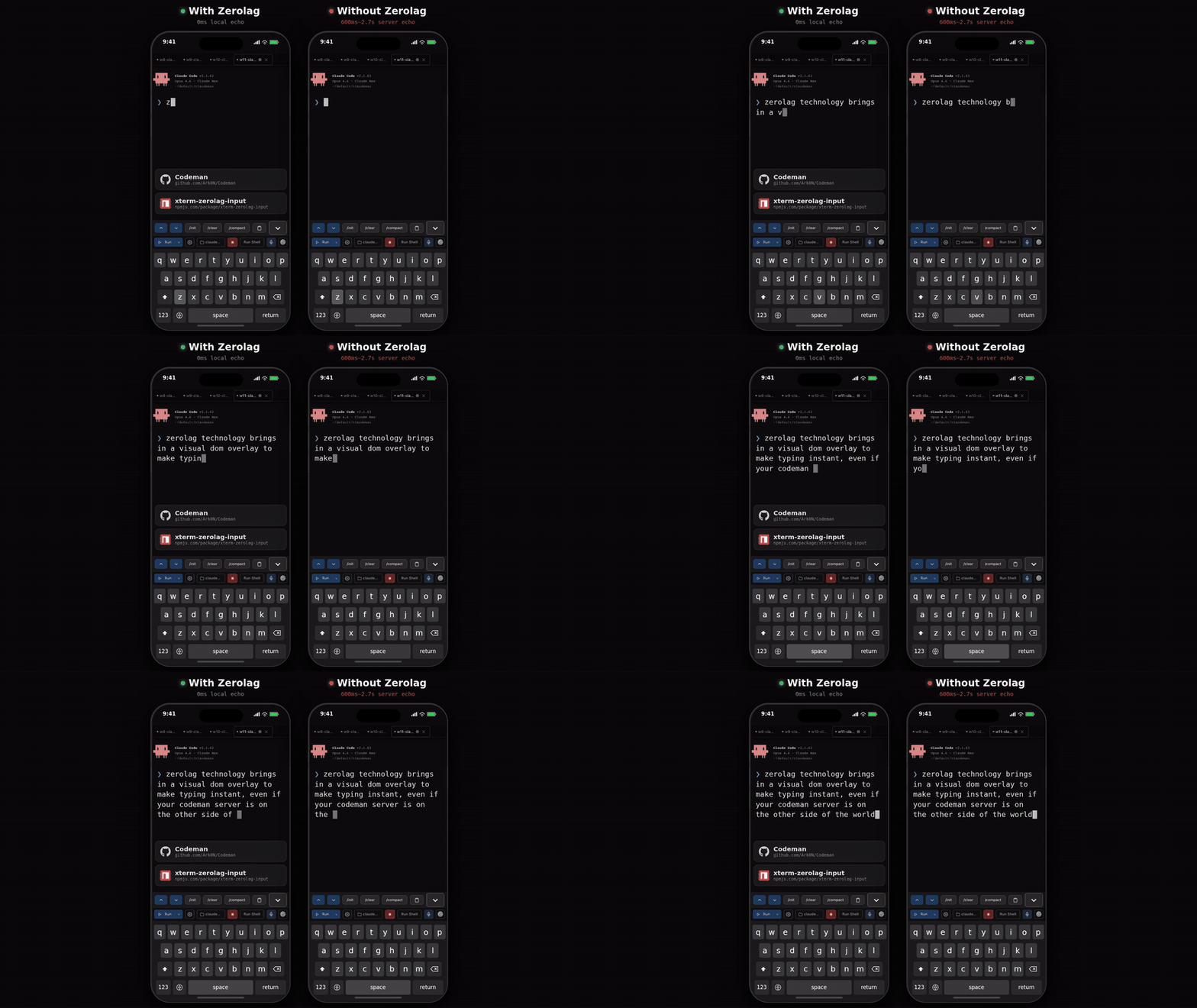
Zerolag Demo — local echo vs server echo side-by-side

When accessing your coding agent remotely (VPN, Tailscale, SSH tunnel), every keystroke normally takes 200-300ms to round-trip. Codeman implements a **Mosh-inspired local echo system** that makes typing feel instant regardless of latency. A pixel-perfect DOM overlay inside xterm.js renders keystrokes at 0ms. Background forwarding silently sends every character to the PTY in 50ms debounced batches, so Tab completion, `Ctrl+R` history search, and all shell features work normally. When the server echo arrives 200-300ms later, the overlay seamlessly disappears and the real terminal text takes over — the transition is invisible. - **Ink-proof architecture** — lives as a `` at z-index 7 inside `.xterm-screen`, completely immune to Ink's constant screen redraws (two previous attempts using `terminal.write()` failed because Ink corrupts injected buffer content) - **Font-matched rendering** — reads `fontFamily`, `fontSize`, `fontWeight`, and `letterSpacing` from xterm.js computed styles so overlay text is visually indistinguishable from real terminal output - **Full editing** — backspace, retype, paste (multi-char), cursor tracking, multi-line wrap when input exceeds terminal width - **Persistent across reconnects** — unsent input survives page reloads via localStorage - **Enabled by default** — works on both desktop and mobile, during idle and busy sessions > Extracted as a standalone library: [`xterm-zerolag-input`](https://www.npmjs.com/package/xterm-zerolag-input) — see [Published Packages](#published-packages). --- ## Respawn Controller The core of autonomous work. When the agent goes idle, the Respawn Controller detects it, sends a continue prompt, cycles context management commands for fresh context, and resumes — running **24+ hours** completely unattended. ``` WATCHING → IDLE DETECTED → SEND UPDATE → /clear → /init → CONTINUE → WATCHING ``` - **Multi-layer idle detection** — completion messages, AI-powered idle check, output silence, token stability - **Circuit breaker** — prevents respawn thrashing when Claude is stuck (CLOSED -> HALF_OPEN -> OPEN states, tracks consecutive no-progress and repeated errors) - **Health scoring** — 0-100 health score with component scores for cycle success, circuit breaker state, iteration progress, and stuck recovery - **Built-in presets** — `solo-work` (3s idle, 60min), `subagent-workflow` (45s, 240min), `team-lead` (90s, 480min), `ralph-todo` (8s, 480min), `overnight-autonomous` (10s, 480min) --- ## Multi-Session Dashboard Run **20 parallel sessions** with full visibility — real-time xterm.js terminals at 60fps, per-session token and cost tracking, tab-based navigation, and one-click management.

Multi-Session Dashboard

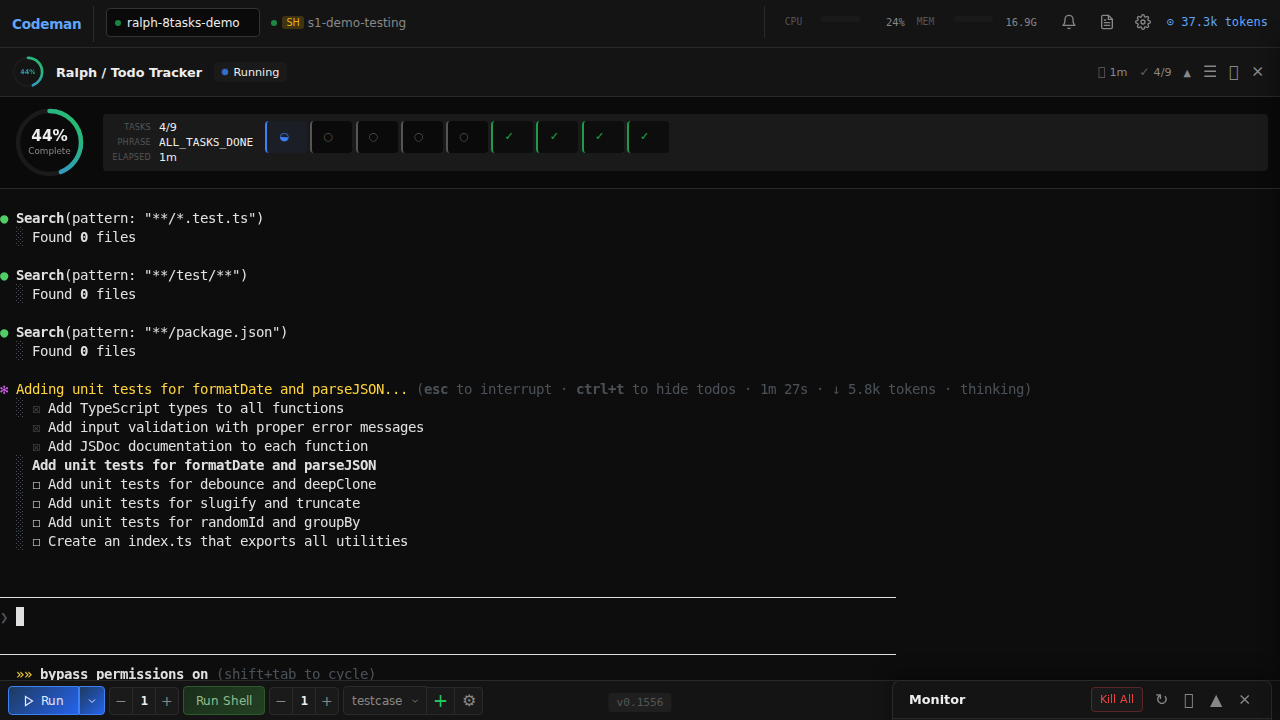
### Persistent Sessions Every session runs inside **tmux** — sessions survive server restarts, network drops, and machine sleep. Auto-recovery on startup with dual redundancy. Ghost session discovery finds orphaned tmux sessions. Managed sessions are environment-tagged so the agent won't kill its own session. ### Hostname-Aware Window Title Running Codeman on multiple hosts (laptop, dev box, NAS)? The browser tab title is `codeman:` so you can tell which backend each tab points at without clicking in: ```bash codeman web # codeman: codeman web --title-hostname dev-box # codeman:dev-box (manual override for noisy hostnames) ``` The title is templated into the served HTML on first byte, so it's correct from the very first paint and works without JavaScript. The same hostname prefix is applied to the tab-flash format (`⚠️ (N) codeman:`) and to OS-level desktop notifications (`codeman:: `), so cross-host alerts in the system notification center are also unambiguous. ### Smart Token Management | Threshold | Action | Result | |-----------|--------|--------| | **110k tokens** | Auto `/compact` | Context summarized, work continues | | **140k tokens** | Auto `/clear` | Fresh start with `/init` | ### Notifications Real-time desktop alerts when sessions need attention — `permission_prompt` and `elicitation_dialog` trigger critical red tab blinks, `idle_prompt` triggers yellow blinks. Click any notification to jump directly to the affected session. Hooks auto-configured per case directory. ### Ralph / Todo Tracking Auto-detects Ralph Loops, `` tags, TodoWrite progress (`4/9 complete`), and iteration counters (`[5/50]`) with real-time progress rings and elapsed time tracking.

Ralph Loop Tracking

### Run Summary Click the chart icon on any session tab to see a timeline of everything that happened — respawn cycles, token milestones, auto-compact triggers, idle/working transitions, hook events, errors, and more. ### Zero-Flicker Terminal Terminal-based AI agents (Claude Code's Ink, OpenCode's Bubble Tea) redraw the screen on every state change. Codeman implements a 6-layer anti-flicker pipeline for smooth 60fps output across all sessions: ``` PTY Output → 16ms Server Batch → DEC 2026 Wrap → SSE → Client rAF → xterm.js (60fps) ``` --- ## Remote Access — Cloudflare Tunnel Access Codeman from your phone or any device outside your local network using a free [Cloudflare quick tunnel](https://developers.cloudflare.com/cloudflare-one/connections/connect-networks/do-more-with-tunnels/trycloudflare/) — no port forwarding, no DNS, no static IP required. ``` Browser (phone/tablet) → Cloudflare Edge (HTTPS) → cloudflared → localhost:3000 ``` **Prerequisites:** Install [`cloudflared`](https://developers.cloudflare.com/cloudflare-one/connections/connect-networks/downloads/) and set `CODEMAN_PASSWORD` in your environment. ```bash # Quick start ./scripts/tunnel.sh start # Start tunnel, prints public URL ./scripts/tunnel.sh url # Show current URL ./scripts/tunnel.sh stop # Stop tunnel ./scripts/tunnel.sh status # Service status + URL ``` The script auto-installs a systemd user service on first run. The tunnel URL is a randomly generated `*.trycloudflare.com` address that changes each time the tunnel restarts.
Persistent tunnel (survives reboots) ```bash # Enable as a persistent service systemctl --user enable codeman-tunnel loginctl enable-linger $USER # Or via the Codeman web UI: Settings → Tunnel → Toggle On ```
Authentication 1. First request → browser shows Basic Auth prompt (username: `admin` or `CODEMAN_USERNAME`) 2. On success → server issues a `codeman_session` cookie (24h TTL, auto-extends on activity) 3. Subsequent requests authenticate silently via cookie 4. 10 failed attempts per IP → 429 rate limit (15-minute decay) **Always set `CODEMAN_PASSWORD`** before exposing via tunnel — without it, anyone with the URL has full access to your sessions.
### QR Code Authentication Typing a password on a phone keyboard is terrible. Codeman solves this with **ephemeral single-use QR tokens** — scan the code on your desktop, and your phone is instantly authenticated. No password prompt, no typing, no clipboard. ``` Desktop displays QR → Phone scans → GET /q/Xk9mQ3 → Server validates → Token atomically consumed (single-use) → Session cookie issued → 302 to / → Desktop notified: "Device authenticated via QR" → New QR auto-generated ``` Someone who only has the bare tunnel URL (without the QR) still hits the standard password prompt. The QR is the fast path; the password is the fallback. #### How It Works The server maintains a rotating pool of short-lived, single-use tokens. Each token consists of a 256-bit secret (`crypto.randomBytes(32)`) paired with a 6-character base62 short code used as an opaque lookup key in the URL path. The QR code encodes a URL like `https://abc-xyz.trycloudflare.com/q/Xk9mQ3` — the short code is a pointer, not the secret itself, so it never leaks through browser history, `Referer` headers, or Cloudflare edge logs. Every **60 seconds**, the server automatically rotates to a fresh token. The previous token remains valid for a **90-second grace period** to handle the race where you scan right as rotation happens — after that, it's dead. Each token is **single-use**: the moment a phone successfully scans it, the token is atomically consumed and a new one is immediately generated for the desktop display. #### Security Design The design is informed by ["Demystifying the (In)Security of QR Code-based Login"](https://www.usenix.org/conference/usenixsecurity25/presentation/zhang-xin) (USENIX Security 2025), which found 47 of the top-100 websites vulnerable to QR auth attacks due to 6 critical design flaws across 42 CVEs. Codeman addresses all six: | USENIX Flaw | Mitigation | |-------------|------------| | **Flaw-1**: Missing single-use enforcement | Token atomically consumed on first scan — replays always fail | | **Flaw-2**: Long-lived tokens | 60s TTL with 90s grace, auto-rotation via timer | | **Flaw-3**: Predictable token generation | `crypto.randomBytes(32)` — 256-bit entropy. Short codes use rejection sampling to eliminate modulo bias | | **Flaw-4**: Client-side token generation | Server-side only — tokens never leave the server until embedded in the QR | | **Flaw-5**: Missing status notification | Desktop toast: *"Device [IP] authenticated via QR (Safari). Not you? [Revoke]"* — real-time QRLjacking detection | | **Flaw-6**: Inadequate session binding | IP + User-Agent stored for audit. Manual session revocation via API. HttpOnly + Secure + SameSite=lax cookies | #### Timing-Safe Lookup Short codes are stored in a `Map`. Validation uses `Map.get()` — a hash-based O(1) lookup that reveals nothing about the target string through response timing. There is no character-by-character string comparison anywhere in the hot path, eliminating timing side-channel attacks entirely. #### Rate Limiting (Dual Layer) QR auth has its own rate limiting, completely independent from password auth: - **Per-IP**: 10 failed QR attempts per IP trigger a 429 block (15-minute decay window) — separate counter from Basic Auth failures, so a fat-fingered password doesn't burn your QR budget - **Global**: 30 QR attempts per minute across all IPs combined — defends against distributed brute force. With 62^6 = 56.8 billion possible short codes and only ~2 valid at any time, brute force is computationally infeasible regardless #### QR Code Size Optimization The URL is kept deliberately short (`/q/` path + 6-char code = ~53-56 total characters) to target **QR Version 4** (33x33 modules) instead of Version 5 (37x37). Smaller QR codes scan faster on budget phones — modern devices read Version 4 in 100-300ms. The `/q/` prefix saves 7 bytes compared to `/qr-auth/`, which alone is the difference between QR versions. #### Desktop Experience The QR display auto-refreshes every 60 seconds via SSE with the SVG embedded directly in the event payload (~2-5KB) — no extra HTTP fetch, sub-50ms refresh. A countdown timer shows time remaining. A "Regenerate" button instantly invalidates all existing tokens and creates a fresh one (useful if you suspect the QR was photographed). When someone authenticates via QR, the desktop shows a notification toast with the device's IP and browser — if it wasn't you, one click revokes all sessions. #### Threat Coverage | Threat | Why it doesn't work | |--------|-------------------| | **QR screenshot shared** | Single-use: consumed on first scan. 60s TTL: expired before the attacker can act. Desktop notification alerts you immediately. | | **Replay attack** | Atomic single-use consumption + 60s TTL. Old URLs always return 401. | | **Cloudflare edge logs** | Short code is an opaque 6-char lookup key, not the real 256-bit token. Single-use means replaying from logs always fails. | | **Brute force** | 56.8 billion combinations, ~2 valid at any time, dual-layer rate limiting blocks well before statistical feasibility. | | **QRLjacking** | 60s rotation forces real-time relay. Desktop toast provides instant detection. Self-hosted single-user context makes phishing implausible. | | **Timing attack** | Hash-based Map lookup — no string comparison timing leak. | | **Session cookie theft** | HttpOnly + Secure + SameSite=lax + 24h TTL. Manual revocation at `POST /api/auth/revoke`. | #### How It Compares | Platform | Model | Comparison | |----------|-------|------------| | **Discord** | Long-lived token, no confirmation, [repeatedly exploited](https://owasp.org/www-community/attacks/Qrljacking) | Codeman: single-use + TTL + notification | | **WhatsApp Web** | Phone confirms "Link device?", ~60s rotation | Comparable rotation; WhatsApp adds explicit confirmation (acceptable tradeoff for single-user) | | **Signal** | Ephemeral public key, E2E encrypted channel | Stronger crypto, but [exploited by Russian state actors in 2025](https://cloud.google.com/blog/topics/threat-intelligence/russia-targeting-signal-messenger) via social engineering despite it | > Full design rationale, security analysis, and implementation details: [`docs/qr-auth-plan.md`](docs/qr-auth-plan.md) --- ## SSH Alternative (`sc`) If you prefer SSH (Termius, Blink, etc.), the `sc` command is a thumb-friendly session chooser: ```bash sc # Interactive chooser sc 2 # Quick attach to session 2 sc -l # List sessions ``` Single-digit selection (1-9), color-coded status, token counts, auto-refresh. Detach with `Ctrl+A D`. --- ## Keyboard Shortcuts | Shortcut | Action | |----------|--------| | `Ctrl+Enter` | Quick-start session | | `Ctrl+W` | Close session | | `Ctrl+Tab` | Next session | | `Alt+1`–`Alt+9` | Switch to tab N | | `Ctrl+Shift+{` / `Ctrl+Shift+}` | Move active tab left / right | | `Ctrl+K` | Kill all sessions | | `Ctrl+L` | Clear terminal | | `Ctrl+Shift+R` | Restore terminal size | | `Ctrl+Shift+V` | Toggle voice input | | `Ctrl/Cmd +/-` | Font size | | `Escape` | Close panels | --- ## API ### Sessions | Method | Endpoint | Description | |--------|----------|-------------| | `GET` | `/api/sessions` | List all | | `POST` | `/api/quick-start` | Create case + start session | | `DELETE` | `/api/sessions/:id` | Delete session | | `POST` | `/api/sessions/:id/input` | Send input | ### Respawn | Method | Endpoint | Description | |--------|----------|-------------| | `POST` | `/api/sessions/:id/respawn/enable` | Enable with config + timer | | `POST` | `/api/sessions/:id/respawn/stop` | Stop controller | | `PUT` | `/api/sessions/:id/respawn/config` | Update config | ### Ralph / Todo | Method | Endpoint | Description | |--------|----------|-------------| | `GET` | `/api/sessions/:id/ralph-state` | Get loop state + todos | | `POST` | `/api/sessions/:id/ralph-config` | Configure tracking | ### Subagents | Method | Endpoint | Description | |--------|----------|-------------| | `GET` | `/api/subagents` | List all background agents | | `GET` | `/api/subagents/:id` | Agent info and status | | `GET` | `/api/subagents/:id/transcript` | Full activity transcript | | `DELETE` | `/api/subagents/:id` | Kill agent process | ### System | Method | Endpoint | Description | |--------|----------|-------------| | `GET` | `/api/events` | SSE stream | | `GET` | `/api/status` | Full app state | | `POST` | `/api/hook-event` | Hook callbacks | | `POST` | `/api/clipboard` | Push text to all connected browsers (`{text}`) | | `GET` | `/api/sessions/:id/run-summary` | Timeline + stats | --- ## Architecture ```mermaid flowchart TB subgraph Codeman["CODEMAN"] subgraph Frontend["Frontend Layer"] UI["Web UI
xterm.js + Agent Windows"] API["REST API
Fastify"] SSE["SSE Events
/api/events"] end subgraph Core["Core Layer"] SM["Session Manager"] S1["Session (PTY)"] S2["Session (PTY)"] RC["Respawn Controller"] end subgraph Detection["Detection Layer"] RT["Ralph Tracker"] SW["Subagent Watcher
~/.claude/projects/*/subagents"] end subgraph Persistence["Persistence Layer"] SCR["Mux Manager
(tmux)"] SS["State Store
state.json"] end subgraph External["External"] CLI["AI CLI
Claude Code / OpenCode"] BG["Background Agents
(Task tool)"] end end UI <--> API API <--> SSE API --> SM SM --> S1 SM --> S2 SM --> RC SM --> SS S1 --> RT S1 --> SCR S2 --> SCR RC --> SCR SCR --> CLI SW --> BG SW --> SSE ``` --- ## Development ```bash npm install npx tsx src/index.ts web # Dev mode npm run build # Production build npm test # Run tests ``` See [CLAUDE.md](./CLAUDE.md) for full documentation. --- ## Codebase Quality The codebase went through a comprehensive 7-phase refactoring that eliminated god objects, centralized configuration, and established modular architecture: | Phase | What changed | Impact | |-------|-------------|--------| | **Performance** | Cached endpoints, SSE adaptive batching, buffer chunking | Sub-16ms terminal latency | | **Route extraction** | `server.ts` split into 13 domain route modules + auth middleware + port interfaces | **−60%** server.ts LOC (6,736 → 2,697) | | **Domain splitting** | `types.ts` → 14 domain files, `ralph-tracker` → 7 files, `respawn-controller` → 5 files, `session` → 6 files | No more god files | | **Frontend modules** | `app.js` → 9 extracted modules (constants, mobile, voice, notifications, keyboard, CJK input, API, Ralph wizard, subagent windows) | **−24%** app.js LOC (15.2K → 11.5K) | | **Config consolidation** | ~70 scattered magic numbers → 9 domain-focused config files | Zero cross-file duplicates | | **Test infrastructure** | Shared mock library, 12 route test files, consolidated MockSession | Testable route handlers via `app.inject()` | Full details: [`docs/code-structure-findings.md`](docs/code-structure-findings.md) --- ## Published Packages ### [`xterm-zerolag-input`](https://www.npmjs.com/package/xterm-zerolag-input) [![npm](https://img.shields.io/npm/v/xterm-zerolag-input?style=flat-square&color=22c55e)](https://www.npmjs.com/package/xterm-zerolag-input) Instant keystroke feedback overlay for xterm.js. Eliminates perceived input latency over high-RTT connections by rendering typed characters immediately as a pixel-perfect DOM overlay. Zero dependencies, configurable prompt detection, full state machine with 78 tests. ```bash npm install xterm-zerolag-input ``` [Full documentation](packages/xterm-zerolag-input/README.md) --- ## License MIT — see [LICENSE](LICENSE) ---

Track sessions. Visualize agents. Control respawn. Let it run while you sleep.